Starlink return windows side by side: Home Depot, Best Buy, Costco, Walmart and starlink.com
Each seller's stated window, the caveats we found, who processes the return, and the one step people forget: cancelling the plan.
We may earn a referral reward from a link on this page. How we make money.
Key takeaways
- starlink.com gives 30 days for a full hardware refund on an undamaged kit, and refunds any demand surcharge with it.
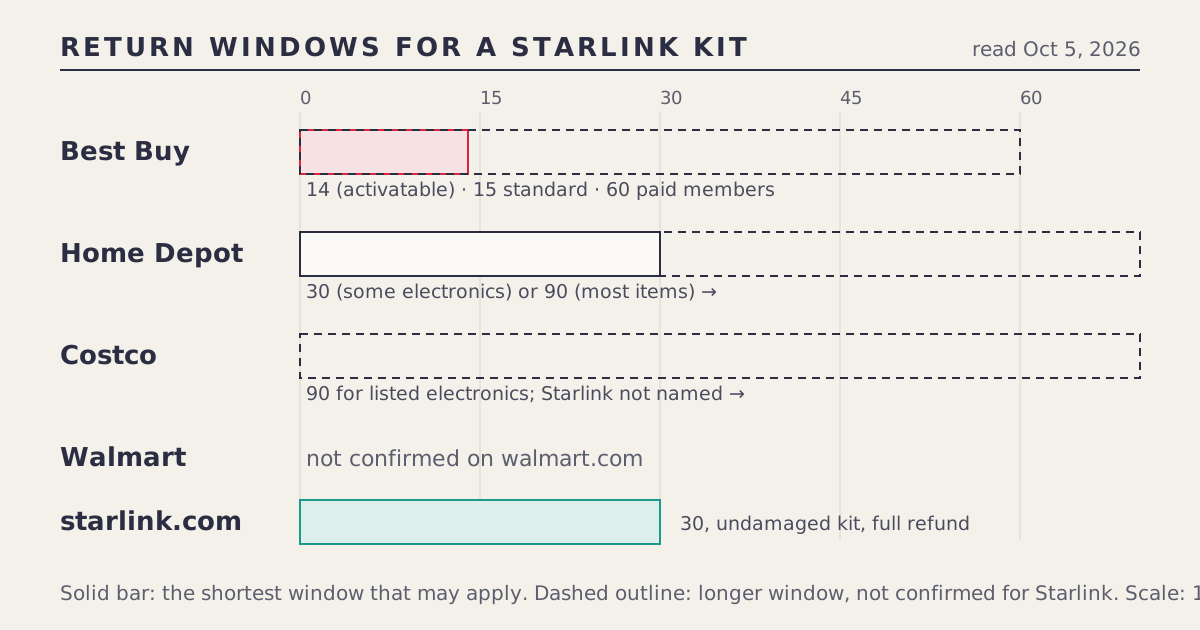
- Store windows range from 14 days (Best Buy, if Starlink counts as an activatable device) to 90 days (Costco and Home Depot's general rule). None of the stores names Starlink in its policy, so each window is a best reading, not a confirmation.
- A store kit goes back to the store. Starlink won't process it.
- Returning hardware never cancels your plan. Cancel the service in the Starlink app as a separate step.
- Rental kits work differently: return within 30 days of cancelling or pay the kit's full retail price.
If you bought your Starlink kit on starlink.com, you have 30 days to return it undamaged for a full hardware refund. If you bought it at a store, the store’s policy applies instead, and that ranges from 14 days at Best Buy (if Starlink counts as an activatable device) to 90 days at Costco and under Home Depot’s general rule. None of the four stores names Starlink in its policy, so treat every store number below as “ask to confirm,” and cancel your Starlink plan separately either way.
Every seller’s window, side by side
| Seller | Stated window | Caveat we found | Who processes it |
|---|---|---|---|
| starlink.com | 30 days, undamaged kit, full hardware refund | Demand surcharge refunded with the return | Starlink |
| Best Buy | 15 days standard; 60 for paid My Best Buy members; 14 for activatable devices | Couldn’t confirm whether Starlink is “activatable”; a restocking fee may apply to activatable items. A 2024 guide described a two-week window. | Best Buy |
| Home Depot | 90 days for most items; 30 days for some consumer electronics | A 2024 guide says Starlink gets 90 days; couldn’t confirm whether the 30-day electronics rule applies | Home Depot |
| Costco | 90 days for listed electronics | Costco’s electronics list doesn’t name Starlink; secondary sites say 90 days applies | Costco |
| Walmart | Not confirmed on walmart.com | Marketplace sellers set their own rules; check who the seller is | Walmart or the marketplace seller |
All store windows were read through search-result snippets of each store’s policy page and older secondary guides on Oct 5, 2026. Stores change policies and can apply category exceptions at the register. The only reliable confirmation is the receipt or a written policy you can point to.
The shortest window you might face
If you’re deciding where to buy and returns matter, plan around the shortest window that could apply at each store:
- Best Buy: 14 days. That’s half of starlink.com’s 30, and may come with a restocking fee.
- Home Depot: 30 days. Equal to starlink.com, if the electronics rule applies. Up to 90 if it doesn’t.
- Costco: 90 days, if the electronics rule covers Starlink, which secondary sites say it does.
- Walmart: unknown. Don’t assume a window until you’ve read the receipt.
- starlink.com: 30 days, stated by Starlink for its own orders.
If your install depends on someone else (a roofer, an electrician, a pole mount), a 14-day window can close before you’ve tested the kit in its final spot. In that case, the longer windows matter more than a few dollars on the price.
Choosing a seller by return window: three examples
A cabin owner who can’t get to the roof for three weeks. The kit will sit in the box until a weekend trip, and the first real test will be at the cabin. A 14-day Best Buy window could close before the kit is ever powered on. Costco’s 90 days (if confirmed) or starlink.com’s 30 days are safer. If neither works, set the kit up on the ground at home the day it arrives to confirm it powers on and connects, then mount it later.
A renter replacing a failed router tonight. Return windows barely matter: the problem is today. A store with stock nearby wins on speed. Keep the receipt and the box anyway, in case the new kit has the same issue.
A first-time buyer worried about trees. The Starlink app’s obstruction check can tell you before you buy whether your sky view works, so do it first. If the result is marginal, pick the longest window you can get, and avoid any seller where a restocking fee might apply. That usually points to starlink.com or Costco over Best Buy.
What to ask at the register
Most of the uncertainty in the table above disappears with three questions, asked before you pay:
- “What’s the return window for this item, and is it printed on the receipt?”
- “Is this treated as an activatable or special-category electronics item?”
- “Is there a restocking fee if I return it opened?”
If the answers differ from what’s printed on the receipt, the receipt usually wins. If the cashier doesn’t know, ask for the customer service desk. A two-minute question now is cheaper than an argument after the window closes.
Who handles the return, and what happens to your plan
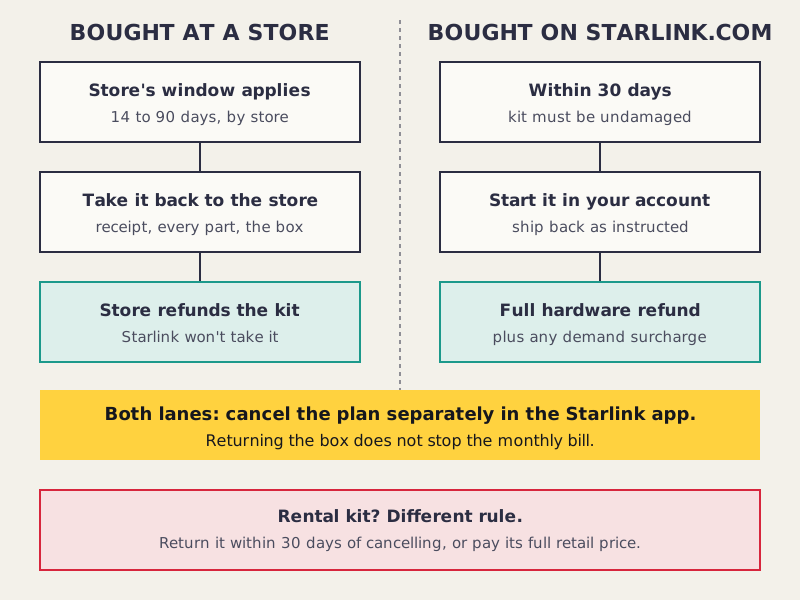
The seller handles the hardware. A Home Depot kit goes back to Home Depot, a Best Buy kit to Best Buy, and so on. Starlink processes returns only for kits it sold.
Starlink handles the service. Your plan was ordered on starlink.com no matter where the box came from. Returning the box doesn’t tell Starlink anything, so the bill keeps coming until you cancel in the app or your account.
Starlink-side charges come back only through Starlink. Starlink says its one-time demand surcharge, charged in high-demand areas when you buy, activate, change plan or move into one, is refunded with a 30-day return. If you bought the kit at a store and paid a surcharge at activation, the store can’t refund it; ask Starlink support what applies to your account.
Rental kits: a different rule
If you rented your kit from Starlink (for example, the $0-up-front rental seen on starlink.com’s national listing on Oct 5, 2026), there’s nothing to “return for a refund.” Instead, Starlink’s terms say to return the kit within 30 days of cancelling, or pay its full retail price. That’s a deadline after cancellation, not a trial window. Our rental guide covers what to pack and what proof to keep.
Commitment offers: the return doesn’t end the commitment
Some starlink.com offers require 12 months of service. Leaving early triggers a prorated change fee, per Starlink’s support page on commitment offers. A 30-day hardware return and a commitment are separate things. If you took a commitment offer, read the terms of your order before assuming a return makes you whole. Our commitment offers help page explains the fee.
Step by step: returning a store kit
- Find the receipt and check the printed return date. If you paid with a card, the store can often look it up, but don’t rely on that.
- Pack every part in the original box: the dish or Mini, router or power supply, cables, stand and mounts. Missing parts are the most common reason a return is refused or reduced.
- Check for a restocking fee on the receipt or at the desk before you hand it over, especially at Best Buy.
- Return it to the store (or by the store’s mail-in process if it offers one for online orders).
- Cancel your Starlink plan in the app. Screenshot the confirmation.
Step by step: returning a starlink.com kit
- Check you’re within 30 days and the kit is undamaged.
- Start the return in your Starlink account and follow the shipping instructions.
- Keep the tracking number until the refund posts.
- Cancel the service if you’re leaving entirely (the return and cancellation can be separate actions in your account).
- Look for the surcharge refund if you paid one at purchase.
Edge cases
- Price dropped after you bought? That’s a price adjustment question, not a return. Stores decide their own adjustments; Starlink doesn’t adjust a store’s price. Our deal-expired help page covers what’s realistic.
- Gift purchase? A gift receipt usually follows the store’s normal window from the purchase date, not the date it was opened. Ask at checkout.
- Marketplace seller on a store website. If the listing says “sold by” a third party, that seller’s policy applies, not the store’s. This is the main risk with Walmart listings.
- Bought at a store, then learned about the free month? You can’t add it to a store kit. If the window is open and you’ve never had Starlink, returning and reordering online is one option; your options after a store purchase walks through it.
Common mistakes
- Returning the kit and forgetting the plan. The single most expensive mistake on this page.
- Assuming a membership window covers Starlink. Best Buy’s 60-day member window may not apply if Starlink is treated as activatable.
- Waiting for the install crew. If the store window is short, test the kit on the ground (with a clear view of the sky) the day you buy it.
- Throwing out the box. Most returns need the original packaging.
What we don’t know
- Whether any store applies a Starlink-specific exception at the register.
- Whether Best Buy counts Starlink as activatable, and whether Home Depot’s 30-day electronics rule covers it.
- Walmart’s window for Starlink sold by Walmart itself.
What to do next
If returns are your main worry, the store vs starlink.com page lets you weigh price against the free month and return terms in one place. Store-specific detail lives on our Best Buy and Home Depot guides and the Costco bundle guide.
Questions people ask
What is Starlink's return policy?
On starlink.com, Starlink gives a full hardware refund if the kit comes back undamaged within 30 days. A demand surcharge charged at purchase is refunded with a 30-day return.
Can I return a Starlink kit bought at a store to Starlink?
No. A kit bought at Home Depot, Best Buy, Costco or Walmart goes back to that store under its own policy and with its receipt.
Which store has the longest Starlink return window?
Costco and Home Depot both state 90 days for most items, but neither names Starlink. Home Depot also has a 30-day rule for some electronics, and Costco's electronics list doesn't mention Starlink. Ask before you buy.
How long does Best Buy give to return Starlink?
Best Buy gives 15 days on most items, 60 for paid My Best Buy members, and 14 days for activatable devices, possibly with a restocking fee. We couldn't confirm which applies to Starlink, so plan for 14.
Does returning my Starlink kit cancel my service?
No. Cancel the plan in the Starlink app or your starlink.com account. Returning the hardware and cancelling the service are separate steps.
What happens if I don't return a rented Starlink kit?
Starlink's terms say to return a rental kit within 30 days of cancelling, or you pay its full retail price.
Do I get the demand surcharge back if I return Starlink?
Starlink says the one-time demand surcharge is refunded with a 30-day return of a starlink.com order. A store can't refund a charge Starlink made.
Sources
- Returns and the 30-day policy (Starlink support)
- Demand surcharge (Starlink support)
- 12-month commitment offers and the change fee (Starlink support)
- Home Depot return policy (homedepot.com, search-result snippet)
- Best Buy return and exchange policy (bestbuy.com, search-result snippet)
- Costco electronics return policy (Costco tech support, search-result snippet)
- Starlink at Costco (budgetseniors.com, Jul 13, 2026)
- Where to buy Starlink equipment (satelliteinternet.com, Nov 2024)
- Starlink Standard Kit V4 (walmart.com, search-result snippet)