$0 up front, but rented: how the Starlink kit rental works and what's still charged
Starlink owns the kit, you return it when you leave, and a few charges can still apply. Here is each one with its date and source, plus when buying makes more sense.
We may earn a referral reward from a link on this page. How we make money.
Key takeaways
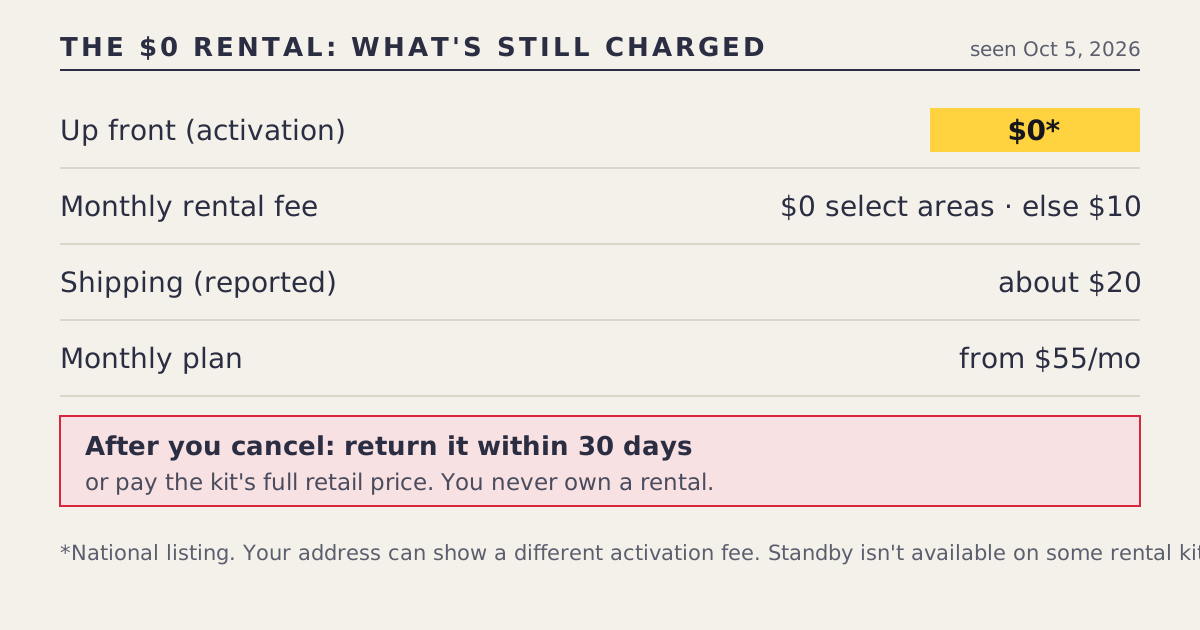
- starlink.com's national listing showed the Standard kit as a $0-up-front rental on Oct 5, 2026. Your address can show a different activation fee.
- A $10/mo rental fee was added around Jun 9, 2026, then cut to $0 in select areas from about Jul 20, 2026. Where the cut isn't offered, the $10 can still apply.
- Shipping of about $20 is reported for rentals. The monthly plan is extra: from $55/mo on Residential.
- Starlink owns the kit. After you cancel, return it within 30 days or you're charged its full retail price.
- Standby isn't available on some rental kits. If you pause service seasonally, buying may suit you better.
Yes, you can get a Starlink kit for $0 up front: starlink.com’s national listing showed the Standard kit that way on Oct 5, 2026. But it’s a rental. Starlink owns the kit, you return it within 30 days of cancelling or pay its full retail price, and some charges can still apply: an address-based activation fee, a $10/mo rental fee where Starlink’s $0 cut isn’t offered, and reported shipping of about $20. The monthly plan is separate, from $55/mo on Residential.
Every charge, line by line
| Charge | What we found | Date | Source type |
|---|---|---|---|
| Up front (activation) | $0 in the national listing; your address can differ | Seen Oct 5, 2026 | starlink.com public data |
| Monthly rental fee | $0 in select areas | Since about Jul 20, 2026 | Secondary |
| Monthly rental fee, elsewhere | $10/mo | Since about Jun 9, 2026 | Secondary |
| Shipping | About $20, reported | Jul 2026 report | Secondary |
| Service plan | Residential from $55/mo (100 Mbps), $85 (200 Mbps), $130 (Max) | Checked Oct 5, 2026 | Starlink support |
| Demand surcharge | One-time, busy areas only; no published amount | Checked Oct 5, 2026 | Starlink support |
| Not returning after cancelling | The kit’s full retail price | Checked Oct 5, 2026 | Starlink support |
The live rows are in our deals log with their check dates. “Secondary” means a press or retailer source reported it, not starlink.com directly; we label it wherever it’s shown.
What renting actually means
When you rent, Starlink keeps ownership. You get the same Standard kit hardware, and you use it as long as you keep service. When you cancel, it goes back. That has three consequences people often miss:
- You never build equity. No matter how many months you pay, the kit isn’t yours to sell, move to another account, or keep as a backup.
- Cancelling starts a deadline. Starlink’s terms say to return the kit within 30 days of cancelling, or you’re charged its full retail price. That’s not a trial window at the start; it’s a deadline at the end.
- Pausing can be limited. Starlink says Standby, its low-cost paused mode, isn’t available on select rental kits. An owned kit can use Standby (reported at $10/mo after a May 2026 increase).
The glossary entry on rental vs purchase has the short version.
The rental fee: $10, then $0 in some places
The fee history is short but confusing, so here it is in order.
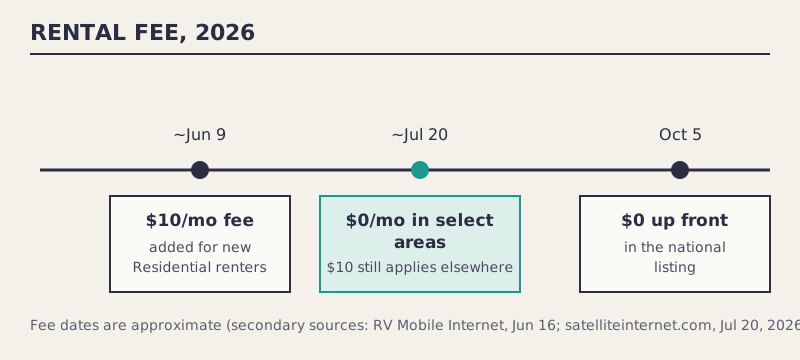
- Around Jun 9, 2026, Starlink added a $10/mo rental fee for new Residential customers, per RV Mobile Internet’s Jun 16 report.
- Around Jul 20, 2026, satelliteinternet.com reported the monthly fee had dropped to $0 in select US areas. Starlink hasn’t published which areas.
- Where the $0 isn’t offered, the $10 still applies, per our log’s notes.
Only starlink.com’s checkout, for your service address, shows which fee you’d pay. We never ask for your address, so we can’t tell you. If you see $10, that’s not an error; your address isn’t in the $0 areas.
Shipping and the activation fee
satelliteinternet.com reported shipping of about $20 on rentals. The national listing showed $0 up front, but Starlink notes your address can show a different activation fee. A rental activation fee is a one-time charge to start the rental; it can be $0. Neither is something a third party can confirm for you.
The demand surcharge is separate: a one-time charge in high-demand areas when you buy, activate, change plan or move into one. Starlink publishes no amount. It applies by address whether you rent or buy, and whether the kit came from starlink.com or a store; see why the surcharge follows your address.
Returning a rental kit
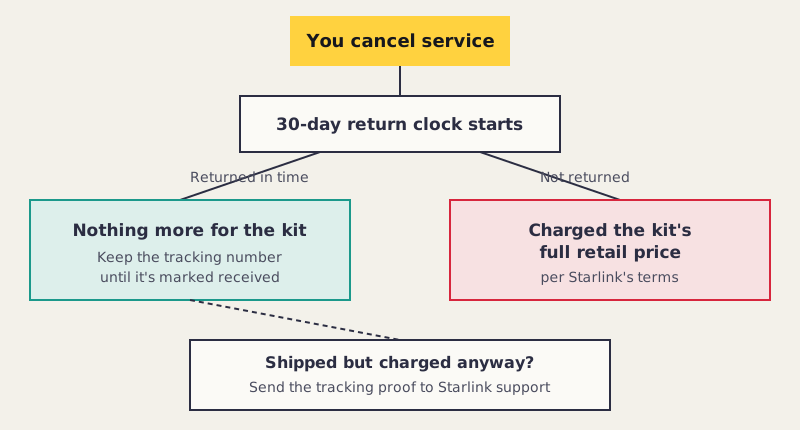
- Cancel in the Starlink app or your account. Screenshot the confirmation with the date.
- Pack everything that came with the kit: the dish, the router, cables, the stand, and the power supply. Use the original box if you have it.
- Ship it as Starlink instructs in your account, well inside the 30 days.
- Keep the tracking number until your account shows the return as received.
- If you’re charged anyway, contact Starlink support with the tracking proof. Our fine print page covers what to gather.
Rent or buy? A worked comparison
Both examples use only charges in our log; the households are hypothetical.
The Lee household, one home, continuous service, in a $0-fee area. Renting: $0 up front, $0 monthly rental fee, about $20 shipping, plus the plan. Buying: $349 up front (where purchase is offered), plus the plan. Over any period, renting costs the household less on hardware, and they return the kit when they leave. Renting wins, provided they never need Standby and will remember the return deadline.
The Ortiz household, a summer cabin, in a $10-fee area. Renting adds ten dollars to every bill, and their rental kit may not allow Standby, so pausing each winter could mean cancelling, returning the kit, and renting again in spring. Buying at $349 costs more up front, but the kit is theirs, Standby is available, and there’s no monthly rental fee. Buying fits better. They could also look at store kits, which are always purchases: Home Depot listed the Standard kit at $349 on Oct 5, 2026 (unclear, from search results).
| You… | Better fit |
|---|---|
| Want nothing up front and plan continuous service | Rent |
| Are in a $0-fee area | Rent, unless you need Standby |
| Are in a $10-fee area and plan to stay years | Compare: the fee adds up; buying may be simpler |
| Pause seasonally | Buy |
| Might move the kit to another account or resell it | Buy |
| Aren’t sure Starlink will work at your address | Either; starlink.com’s 30-day return covers purchases, and a rental can be cancelled and returned |
Checklist before you accept a rental at checkout
- Read the activation fee line for your address. $0 in the national listing doesn’t guarantee $0 for you.
- Read the monthly rental fee line. $0 or $10 depending on area.
- Check for a demand surcharge. It’s one-time and address-based, and Starlink publishes no amount.
- Note the plan price separately. The rental fee and the plan are two different lines.
- Decide whether you’ll ever need Standby. If yes, confirm it’s available for the rental kit, or buy instead.
- Save a screenshot of the checkout with the date. If a charge appears later that wasn’t on it, you have a record.
Renting when you move
A rental kit can move with you if you keep service, but two things follow the address, not the kit. First, Starlink says the demand surcharge can apply when you move into a high-demand area, so a move can add a one-time charge even though nothing about the kit changed. Second, the rental fee depends on area; the $0 rental fee in one place isn’t a promise in the next. If you’re moving and ending service instead, the 30-day return clock starts when you cancel, so pack the kit before the movers do.
Is the rental only for Residential?
Our log’s rental rows are for the Standard kit on Residential plans. The Mini is a different case: starlink.com sells it from $149 with a Roam plan, and Residential Max customers can get a Mini as a no-charge rental, which comes with the same “it’s Starlink’s kit” logic. See free Mini with Residential Max.
Common mistakes
- Treating $0 up front as owning the kit. You’re renting.
- Missing the 30-day return deadline after cancelling. It’s the most expensive mistake on this page: the kit’s full retail price.
- Assuming you can pause. Standby isn’t available on select rental kits.
- Assuming the $0 monthly fee applies everywhere. It’s for select areas only.
- Throwing away the box and accessories. You’ll need them to return everything.
What we don’t know
- Which areas get the $0 monthly rental fee.
- The exact current shipping charge for your address (about $20 is a report, not a quote).
- Which rental kits can’t use Standby.
- The exact “full retail price” Starlink would charge for an unreturned kit today.
What to do next
Our free kit page lists the live $0 offers and their catches, and updates when a row changes. If you’re weighing a rental against a store kit, where to buy Starlink puts both side by side. If a rental charge surprised you after the fact, the fine print page explains each fee and what to ask support. For the other meanings of “free” in Starlink headlines, read “Free Starlink dish”: what the phrase has meant.
Questions people ask
Can you rent Starlink equipment?
Yes. On Oct 5, 2026 starlink.com's national listing showed the Standard kit as a rental with $0 up front. Starlink keeps ownership, and you return the kit within 30 days of cancelling.
How much does it cost to rent a Starlink dish?
Up front, $0 in the national listing (your address can differ). The monthly rental fee is $0 in select areas since about Jul 20, 2026, and $10 elsewhere. Shipping of about $20 is reported. The service plan is separate, from $55/mo for Residential.
Do I have to return the Starlink rental kit?
Yes. Starlink's terms say to return it within 30 days of cancelling, or you pay the kit's full retail price.
Can I pause a rented Starlink kit?
Not always. Starlink says Standby, its low-cost paused mode, isn't available on select rental kits. Check your account before counting on it.
Is it better to rent or buy Starlink?
Renting suits people who want nothing up front and plan to keep continuous service. Buying suits people who want to pause seasonally, resell later, or avoid a monthly rental fee where the $0 cut isn't offered.
What if I'm charged for a rental kit I returned?
Keep the tracking number until the return shows as received. If you're charged after shipping in time, contact Starlink support with the tracking proof.
Does the rental fee depend on my address?
Yes. The $0 monthly fee is offered only in select areas that Starlink hasn't published. Only checkout for your address shows which applies.
Sources
- Residential plans and kits, US national listing (starlink.com public data)
- What is the rent Starlink option? (Starlink support)
- Returns and the 30-day policy (Starlink support)
- Standby Mode (Starlink support)
- Starlink rental: what it costs (satelliteinternet.com, Jul 20, 2026)
- Starlink implements $10 rental fee for Residential plans (RV Mobile Internet, Jun 16, 2026)
- Starlink Roam, Residential and Standby price increases (RV Mobile Internet, May 16, 2026)
- Starlink internet review and prices (satelliteinternet.com)
- What are the Residential plans? (Starlink support)
- Demand surcharge (Starlink support)