Free Mini with Residential Max: a rental, not a gift
What the perk includes, the rental terms, the disputed start date, the unconfirmed expansion to every Residential plan, and the math on Max vs buying a Mini outright.
We may earn a referral reward from a link on this page. How we make money.
Key takeaways
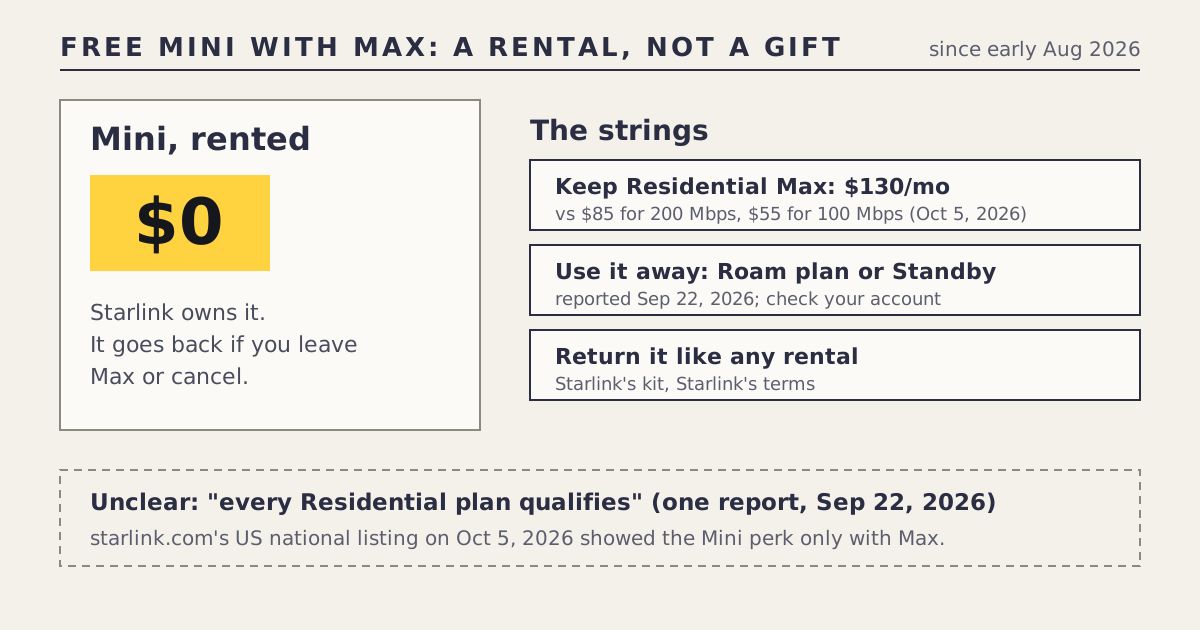
- Since early August 2026 (sources say Aug 7 to Aug 11), Residential Max customers can get a Mini at $0 as a rental.
- Max is the top Residential tier: $130/mo on Oct 5, 2026, against $85 for 200 Mbps and $55 for 100 Mbps.
- The Mini stays Starlink's. Per a Sep 22, 2026 report, it must stay on Standby or a Roam plan, and goes back within 30 days if you leave Residential or cancel the Mini line.
- A Sep 22 report said every Residential plan now qualifies. starlink.com's national listing on Oct 5 didn't show that, so we list it as unclear.
- If you wouldn't choose Max anyway, buying a Mini from $149 is usually the better route.
Yes, Residential Max customers can get a Starlink Mini for $0, but it’s a rental, not a gift. Since early August 2026, starlink.com has offered eligible Max orders “an extra Mini kit for travel.” The Mini stays Starlink’s property, it’s tied to Max ($130/mo on Oct 5, 2026, the top Residential tier), and a September report says it has to sit on Standby or a Roam plan to keep the rental. If you’d pick Max anyway, it’s a genuine extra. If you’d upgrade only for the Mini, buying one from $149 is usually cheaper.
What the perk includes
| Detail | Source | |
|---|---|---|
| What | An extra Mini kit for travel, for eligible Residential Max orders | Starlink support (read via public data) |
| Price | $0 hardware rental | Deals log |
| Start | Early August 2026; sources say Aug 7 to Aug 11 | Tesla North, others |
| Who | New and eligible Residential Max customers in the US (and Canada) | Tesla North, Aug 7 |
| How you get it | An email link to claim the Mini, within about a week of signing up, per the report | Tesla North, Aug 7 |
| Ownership | Starlink keeps it | Tesla North, Sep 22 |
| Status in our log | Live, checked Oct 5, 2026 | Deals log |
Tesla North described it on Aug 7, 2026 as a restored perk: Starlink had offered a free Mini with Max before, removed it in June, and brought it back in August. That’s why some older articles say it no longer exists.
The strings, in plain English
- You need Max. Residential Max cost $130/mo on Oct 5, 2026. The other Residential tiers were $85 (200 Mbps) and $55 (100 Mbps). The perk only makes sense if Max is the plan you want for your home.
- It’s a rental. Starlink owns the Mini. Per Tesla North’s Sep 22, 2026 report, if you cancel your Residential plan, switch your primary plan type, or cancel the Mini’s service line, you must return it within 30 days or be charged its retail price.
- It needs its own service status. The same report says the Mini must stay on Standby Mode or a Roam plan to keep the rental. Standby is Starlink’s low-cost paused mode ($10/mo after a May 2026 increase, per RV Mobile Internet). A Roam plan is what lets you actually use the Mini away from home; Roam 100GB was $55/mo on Oct 5, 2026 before any discount. The Aug 7 report also mentioned a discount on Roam plans for Max customers; we haven’t verified its size for US accounts, so check your account before counting on it.
- One per customer. The Sep 22 report says invitations are limited to one kit per customer.
So the hardware is free. Using it may not be. Read your account’s terms when you claim it, because our sources are press reports, not Starlink’s own terms page.
The start-date dispute (Aug 7–11)
Our log records the start as early August 2026, with sources ranging from Aug 7 to Aug 11. The likely reason is that the perk reached accounts over several days, and different outlets reported it on the day they saw it. It doesn’t matter much now: the perk was live when we checked on Oct 5, 2026. It matters only if you signed up for Max in early August and didn’t get a claim email; if so, contact Starlink support and mention the date you ordered.
The unconfirmed expansion to every Residential plan
On Sep 22, 2026, Tesla North reported that the free Mini rental had expanded from Max to every Residential plan in “select countries,” with the same Standby-or-Roam condition. That would change the math completely: a $55/mo customer would get the same free Mini.
We list it as unclear, for two reasons:
- It’s one report, and it doesn’t name the countries.
- starlink.com’s US national listing on Oct 5, 2026 showed the Mini perk only with Max.
If you’re on a non-Max Residential plan, check your Starlink account for an offer. If you see one, it’s real for your account. Our deals log will move the row to “live” or strike it through once a second source or starlink.com settles it, and deal news will carry the change.
Max for the Mini, or buy the Mini?
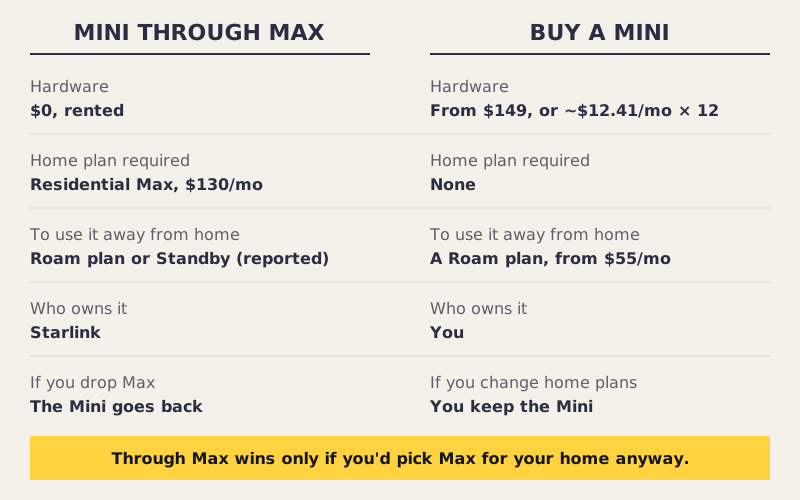
The question isn’t “free vs $149.” It’s “what does Max cost me compared with the plan I’d otherwise choose?”
If you’d choose Max anyway (for its speed, or because several people stream and work from home), the Mini is a real extra at no hardware cost. You’d still pay for a Roam plan when you use it on the road, but you’d pay that with a purchased Mini too.
If you’d otherwise choose 200 Mbps, upgrading to Max adds the gap between $85 and $130 to every monthly bill. Within a few months, that’s more than the Mini’s $149 purchase price, and you’d still be renting.
If you’d otherwise choose 100 Mbps, the gap between $55 and $130 is larger still. Buying the Mini is the clear choice.
Buying also has a structural advantage: you own the Mini. Change your home plan, move, or cancel home service, and the Mini is still yours. With the Max perk, it goes back.
A worked example
The Parks have a busy household and were already planning to order Residential Max at $130/mo. They take the free Mini rental, leave it on Standby most of the year, and switch it to a Roam plan for a two-week road trip. Their extra cost is Standby for the months it’s parked and Roam for the trip, which they’d also pay with a purchased Mini (Standby availability aside). The perk saves them the Mini’s price.
Jordan lives alone and is happy with 100 Mbps at $55/mo, but wants a Mini for camping. Upgrading to Max to get the free Mini would cost the gap between $55 and $130 every month, plus Standby or Roam for the Mini. Buying a Mini from $149 and putting it on Roam only when camping is far cheaper. The Max perk is the wrong choice for Jordan.
Claiming it and keeping it: step by step
- Order or switch to Residential Max on starlink.com. The perk is for eligible Max orders.
- Watch for the claim email. Tesla North reported an email link arriving within about a week. If it doesn’t arrive, contact support with your order date.
- Claim the Mini and check the terms shown in your account. Our sources are press reports; your account’s terms are what bind you.
- Choose its service status. Standby while it’s parked, a Roam plan when you travel, per the September report. Check the current price of each in your account before you switch.
- Keep the box and accessories. Per the report, if you cancel Residential, change plan type or cancel the Mini line, it goes back within 30 days, or you’re charged its retail price.
- Set a reminder before any plan change. Dropping from Max to a lower tier may count as a change that ends eligibility. Ask support before you downgrade.
Who the perk suits, and who it doesn’t
| You… | Verdict |
|---|---|
| Already chose Max for home | Take the Mini; it’s a free extra |
| Travel a few weeks a year | Good fit, if you’re on Max anyway |
| Need a Mini but not Max | Buy a Mini from $149 instead |
| Want a Mini as a permanent second home dish | Neither route is cheap: the Mini is sold around Roam plans, and after a Roam plan’s high-speed allowance, service drops to low-speed data for the rest of the billing period (Engadget, Aug 18, 2026) |
| Might cancel or downgrade within months | Remember the return clock; buying may be simpler |
How it compares with other “free” Starlink offers
The Max Mini is one of three things “free Starlink dish” has meant since 2025: a $0 kit with a 12-month commitment (2025, ended), a $0-up-front Standard kit rental (live), and this. All three had a string. What “free Starlink dish” has meant puts them side by side.
Common mistakes
- Thinking the Mini is yours to keep. It’s a rental; it goes back if you leave Max.
- Forgetting the Mini’s own service. Standby or Roam, per the September report.
- Upgrading to Max only for the Mini. For most people on lower tiers, buying is cheaper.
- Assuming the expansion applies to you. Check your account; we can’t confirm it from starlink.com’s US listing.
- Cancelling Max and forgetting the Mini. Per the report, it has to go back within 30 days.
What we don’t know
- Whether the free Mini rental now applies to every US Residential plan.
- The exact Roam discount, if any, that US Max customers get.
- Whether the perk has an end date; none has been stated.
What to do next
If Max isn’t for you, the $149 Mini: what the price includes explains the purchase route, and what to settle about the Roam plan covers the plan condition. Our free kit page and Mini deals page both track this perk and will update if the expansion is confirmed.
Questions people ask
Do you get a free Starlink Mini with Residential Max?
Yes, as a rental. Since early August 2026, Residential Max customers can get a Mini at no hardware charge. Starlink owns it, and it goes back if you leave Max or cancel.
Is the free Starlink Mini really free?
The hardware rental is $0, but it comes with Residential Max ($130/mo on Oct 5, 2026). A Sep 22, 2026 report says the Mini must also stay on Standby or a Roam plan to keep the rental.
Can I keep the free Starlink Mini?
No. It's a rental. Per a Sep 22, 2026 report, if you cancel your Residential plan, switch plan type or cancel the Mini line, you return it within 30 days or pay its retail price.
Does every Starlink Residential plan get a free Mini?
One outlet reported on Sep 22, 2026 that it does, in 'select countries.' starlink.com's US national listing on Oct 5 showed the Mini perk only with Max, so we list the expansion as unclear.
Is it cheaper to upgrade to Max for the Mini or buy one?
For most people, buying is cheaper. The Mini was listed from $149 on starlink.com since Oct 2, 2026; upgrading from the 200 Mbps plan to Max adds the gap between $85 and $130 to every monthly bill.
When did the free Mini with Max start?
Early August 2026. Sources disagree on the exact day, between Aug 7 and Aug 11. Tesla North described it as a restored perk that had been removed in June.
Sources
- Optional Mini kit for travel (Starlink support)
- SpaceX restores free Starlink Mini perk in Canada and the U.S. (Tesla North, Aug 7, 2026)
- Starlink expands free Mini rentals to more Residential customers (Tesla North, Sep 22, 2026)
- You can use your Starlink Mini at home, but it'll cost you (Engadget, Aug 18, 2026)
- What are the Residential plans? (Starlink support)
- What are the Roam service plans? (Starlink support)
- Roam plans and kits, US national listing (starlink.com public data)
- Standby Mode (Starlink support)
- Starlink Roam, Residential and Standby price increases (RV Mobile Internet, May 16, 2026)