The demand surcharge follows your address, not the store: what a store kit can't skip
What the surcharge is, the four moments it can apply, why a store box doesn't change it, how activation fees differ, and what to check before you buy.
We may earn a referral reward from a link on this page. How we make money.
Key takeaways
- Starlink's demand surcharge is a one-time charge in high-demand areas when you buy, activate, change plan or move into one.
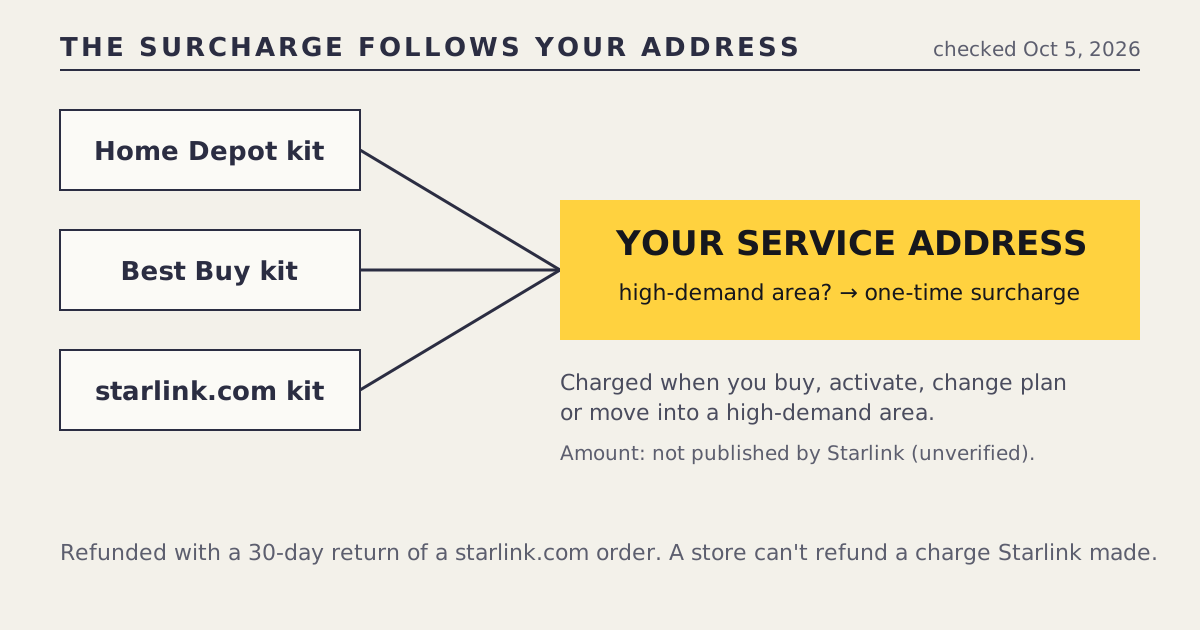
- It follows the service address. Activating a store-bought kit at a high-demand address can trigger it just as a starlink.com order can.
- Starlink publishes no amount; it depends on the address. We list the amount as unverified.
- It's refunded with a 30-day return of a starlink.com order. A store can't refund a charge Starlink made.
- Rental activation fees are address-based too: $0 in the national listing on Oct 5, 2026, but your address can differ.
No, a store kit doesn’t avoid Starlink’s demand surcharge. The surcharge is a one-time charge in high-demand areas, applied when you buy, activate, change plan or move into one, and it’s tied to the service address, not to where the box came from. Activating a Home Depot or Best Buy kit at a busy address can trigger it just as a starlink.com order would. Starlink publishes no fixed amount; you see it at checkout or activation for your address.
What the surcharge is
From Starlink’s support page on the demand surcharge, as read on Oct 5, 2026:
| Detail | |
|---|---|
| What | A one-time charge |
| Where | High-demand areas |
| When | When you buy, activate, change plan, or move into a high-demand area |
| Amount | No published amount; depends on the address (we list it as unverified) |
| Refund | Refunded with a 30-day return |
It isn’t a monthly fee and doesn’t change your plan price. It’s a one-off charge that Starlink uses where network capacity is in demand. The glossary has the short definition, and the fine print page lists it alongside activation fees and rental terms.
Why a store box doesn’t skip it
The surcharge is about the network at your address, and the network doesn’t know or care who sold you the dish. Look at the four triggers:
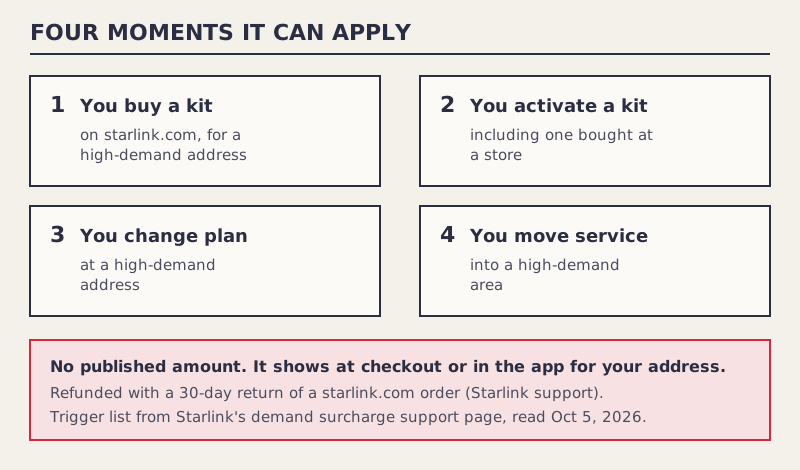
- Buying. Applies to a starlink.com order for a high-demand address.
- Activating. Applies to any kit, including one from a store. This is the trigger store buyers often miss.
- Changing plan. Applies at a high-demand address regardless of the kit’s origin.
- Moving into a high-demand area. Applies when the service address changes.
Buying at a store skips only the first trigger, and the second catches the same customer a few days later when they activate. So the honest comparison between a store kit and a starlink.com order puts the surcharge on both sides of the ledger, at the same amount.
The refund difference
Here the seller does matter. Starlink says the surcharge is refunded with a 30-day return of a starlink.com order. With a store kit:
- The store refunds the hardware under its own return policy.
- The surcharge was charged by Starlink, at activation. The store can’t refund it.
- Whether Starlink refunds it when you return a store kit to the store isn’t covered in our sources. Ask Starlink support before you return.
If you’re in a busy area and unsure Starlink will work for you, that’s a small point in favor of starlink.com: the refund path for both the kit and the surcharge is in one place.
Activation fees: also address-based
The rental activation fee is a different charge. It applies when you rent a kit from Starlink:
- starlink.com’s national listing showed $0 up front for the Standard kit rental on Oct 5, 2026.
- Starlink notes your address can show a different activation fee.
A store kit is a purchase, so there’s no rental activation fee in the same sense. But any charges at service sign-up, including a surcharge, are shown by Starlink for your address in the app or at checkout. The store has no say in them. That’s the second half of the same lesson: the store sets the box price, and Starlink sets everything tied to service.
The surcharge in a store-vs-online comparison
| Line | Store kit | starlink.com order |
|---|---|---|
| Kit | Store’s price (Standard $349 at Home Depot, seen Oct 5, 2026) | $349 where purchase is offered, or a $0-up-front rental |
| Demand surcharge | Same amount at activation, if your address is high-demand | Same amount at checkout, if your address is high-demand |
| Surcharge refund | Not via the store; ask Starlink | With a 30-day return |
| Plan price | Same | Same |
| Referral free month | Never eligible | One month for first-time customers |
Because the surcharge is identical on both sides, it cancels out of the comparison. What’s left is the kit price, the free month and the return terms. Where to buy Starlink works through those lines.
Promos don’t remove it either
Some starlink.com promos have been explicit about this. The March 2026 Residential promo ($39/mo for six months, ended Mar 31, 2026) was address-specific, and busy areas could see a surcharge alongside it, per our log. A cheap monthly price and a surcharge can arrive together. Read the whole checkout, not just the plan line.
The surcharge next to other one-time charges
It helps to keep the one-time charges apart, because they come from different places and follow different rules:
| Charge | Who sets it | Depends on | Applies to store kits? |
|---|---|---|---|
| Kit price | The seller | The seller | Yes, it’s the store’s price |
| Sales tax | Tax rules for the sale | The purchase | Yes, at the register |
| Rental activation fee | Starlink | Your address ($0 in the national listing, Oct 5, 2026) | No, store kits aren’t rentals |
| Demand surcharge | Starlink | Your address, at buy, activate, plan change or move | Yes, at activation |
| Shipping | The seller | The seller (about $20 reported for rentals) | Only if the store ships it |
Only the first and last rows are something a store controls. Everything tied to service is Starlink’s, and most of it depends on the address.
Questions to ask Starlink support
If the surcharge is a deciding factor, these questions get a definite answer for your account, which no article can give:
- “Does my service address currently carry a demand surcharge, and how much?”
- “If I activate a kit I bought at a store, will it apply?”
- “If I return a store kit to the store within its window, is the surcharge refunded?”
- “Will changing from one Residential plan to another trigger it here?”
- “If I move service to a new address, how do I check that address first?”
Keep the replies. Surcharge rules can change, and a dated answer is useful if a charge appears later.
How to find out if your address has a surcharge
- Go to starlink.com and enter the service address, the place the dish will be used.
- Proceed to checkout and read every line. A surcharge appears as its own line.
- If you already own a store kit, the Starlink app shows charges when you activate and choose a plan.
- Screenshot it with the date. If the amount changes later, you have a record.
We never ask for your address, so this is a step only you can do.
Two worked examples
Pat, in a busy suburb, buys a Standard kit at Home Depot for $349. At activation, the app shows a one-time demand surcharge for Pat’s address. Pat would have seen the same surcharge on a starlink.com order. Buying at the store didn’t save it, and if Pat had never had Starlink, the store kit also gave up the referral free month. Had Pat ordered on starlink.com and returned the kit within 30 days, the surcharge would have been refunded along with it.
Lou, in a rural county, sees no surcharge at checkout. For Lou the surcharge simply isn’t a factor, and the store-or-online choice comes down to price, the free month, returns and speed.
Moving with Starlink
Moving into a high-demand area is one of the four triggers. If you’re relocating with an existing kit, owned or rented, check the new address on starlink.com before you move service. A surcharge you never paid at your old address can appear at the new one. If you’re renting, remember also that a rental’s monthly fee depends on area: the $0 rental fee offered in select areas since about Jul 20, 2026 isn’t guaranteed at a new address.
Common mistakes
- Buying at a store to dodge a surcharge. It applies at activation too.
- Leaving the surcharge out of a store-vs-online comparison. Include it on both sides, or neither.
- Expecting the store to refund it. The store didn’t charge it.
- Changing plan casually at a busy address. Plan changes are a trigger.
- Relying on an amount from a forum or article. Starlink publishes none; only your checkout shows it.
What we don’t know
- The surcharge amount for any address; Starlink doesn’t publish one.
- Which areas count as high-demand at any given time.
- Whether Starlink refunds a surcharge when a store kit goes back to the store.
What to do next
The fine print page collects every fee and condition we track, with dates. For the full store-or-online decision, use the store vs starlink.com tool or read Home Depot’s $299-with-card comparison, which shows how the other lines add up.
Questions people ask
What is the Starlink demand surcharge?
A one-time charge Starlink applies in high-demand areas when you buy, activate, change plan or move into one. Starlink doesn't publish a fixed amount; it depends on the address.
Does buying Starlink at a store avoid the surcharge?
No. The surcharge follows the service address. Activating a store-bought kit at a high-demand address can trigger it, the same as ordering on starlink.com.
How much is the Starlink demand surcharge?
Starlink publishes no amount. It's shown at checkout or activation for your address. We list the amount as unverified.
Is the Starlink surcharge refundable?
Starlink says it's refunded with a 30-day return of a starlink.com order. For a store kit, the store refunds the hardware but can't refund a charge Starlink made; ask Starlink support.
Do I pay the surcharge again if I move?
Starlink lists moving into a high-demand area as one of the triggers, so a move can bring a surcharge even if you paid none at your old address.
Is there an activation fee for a store-bought Starlink?
A store kit is owned, not rented, so the rental activation fee doesn't apply in the same way. Any charges at service sign-up, including a surcharge, follow your address and show in the app or at checkout.
Sources
- Demand surcharge (Starlink support)
- Residential plans and kits, US national listing (starlink.com public data)
- What is the rent Starlink option? (Starlink support)
- Returns and the 30-day policy (Starlink support)
- What are the Residential plans? (Starlink support)
- How do I use a referral link? (Starlink support)
- Starlink cuts prices: $39/mo deal through March 31 (5Gstore, Mar 5, 2026)
- Starlink Standard 4 X kit (homedepot.com, search-result snippet)