$0 rental vs the $149 Mini: lower up front isn't the whole story
One costs nothing at checkout and the other costs $149, but the cheaper first payment can be the more expensive choice. It depends on where you'll use it.
We may earn a referral reward from a link on this page. How we make money.
Key takeaways
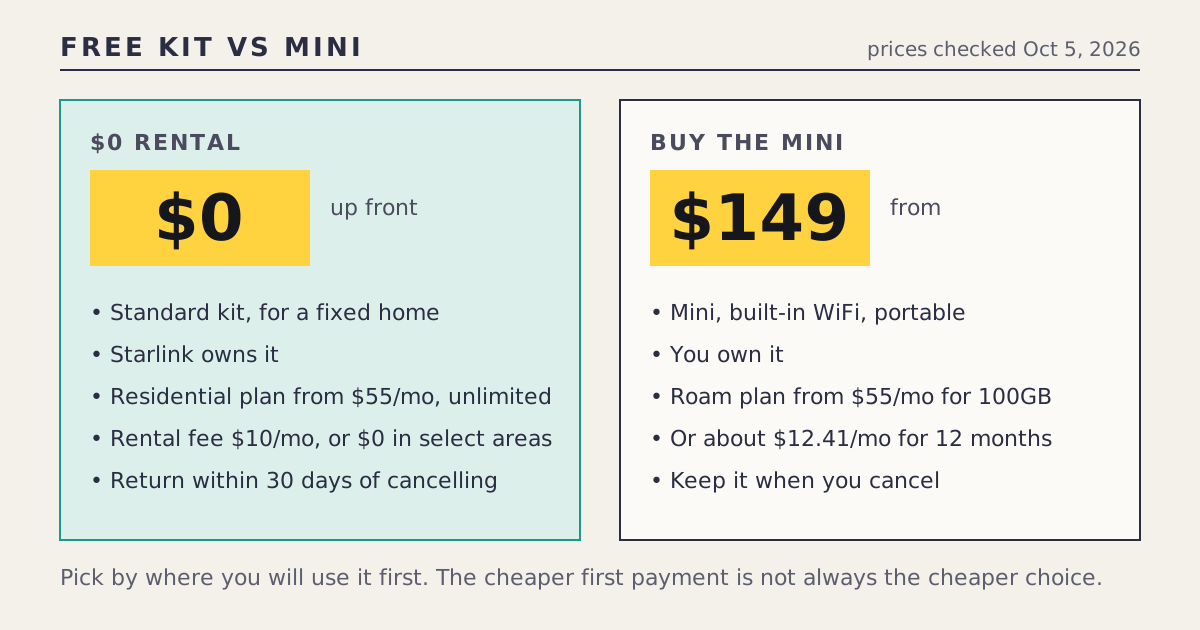
- The $0 rental is a Standard kit for a home on a Residential plan. The $149 Mini is a portable kit you buy, normally on a Roam plan.
- Monthly plans start at the same $55 (Residential 100 Mbps and Roam 100GB, checked Oct 5, 2026), but Residential is unlimited data and Roam 100GB is capped.
- The rental can carry a $10-a-month fee where the $0 fee isn't offered, and you must return the kit within 30 days of cancelling or pay its full price.
- The Mini is yours: no return when you cancel, and you can resell it. The trade-off is $149 at checkout, or about $12.41 a month for 12 months.
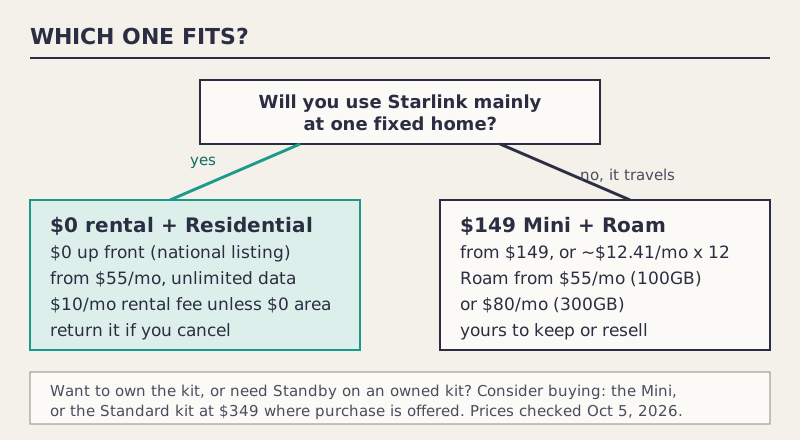
- For a fixed home, the rental usually fits better. For travel, the Mini is the only one of the two built for it.
The $0 rental and the $149 Mini aren’t two prices for the same thing. The rental is a Standard kit for a home on a Residential plan; the Mini is a portable kit you buy and normally run on a Roam plan. The rental wins on the first payment, and for a fixed home it usually wins overall. The Mini wins when you need to take it with you, or when you want to own the hardware outright. Compare where you’ll use it first, then the money.
Both options were live on starlink.com when we checked on Oct 5, 2026: the Standard kit as a rental with $0 up front in the national Residential listing, and the Mini from $149 in the Roam listing, a price that began Oct 2, 2026.
The two options, line by line
| $0 rental | $149 Mini | |
|---|---|---|
| Kit | Standard kit | Mini (built-in WiFi) |
| Up front | $0 in the national listing; your address can differ | From $149, or about $12.41/mo for 12 months |
| Who owns it | Starlink | You |
| Plan it goes with | Residential: $55 (100 Mbps), $85 (200 Mbps), $130 (Max) | Roam: $55 (100GB), $80 (300GB) |
| Data | Unlimited | Capped by plan, then low speed |
| Extra monthly | Rental fee: $10/mo, or $0 in select areas | None for the kit if bought outright |
| When you cancel | Return within 30 days or pay full price | Keep it; resell if you like |
| Pausing | Standby isn’t available on some rental kits | Roam is month to month |
| Portable | Not designed for it | Yes |
Plan prices were checked Oct 5, 2026. The rental fee was added for new Residential customers from about Jun 9, 2026, and since about Jul 20, 2026 it has been $0 in select areas; shipping of about $20 is reported.
Why “lower up front” misleads
$0 is less than $149, but the first payment isn’t what you’ll pay over the months you keep Starlink. Three things move the result:
- The rental fee. Where the $0 fee isn’t offered, each month carries $10 on top of the plan. That’s a cost a Mini owner doesn’t pay.
- The plan. At the entry level both start at $55, but they aren’t the same service: Residential 100 Mbps has unlimited data at one address, while Roam 100GB is capped portable data.
- What happens when you leave. Cancel a rental and you owe the kit back within 30 days, or its full retail price. Cancel with a Mini and you still own a kit.
When the rental is the better fit
- One fixed home. A Residential plan gives unlimited data at your address, at the same $55 entry price as Roam 100GB.
- You’d rather not spend anything at checkout. $0 up front in the national listing, where your address shows it.
- You live in an area where the rental fee is $0. Then the rental’s main ongoing extra disappears.
- You’re not sure you’ll keep Starlink. Returning a rental costs you nothing for the kit, as long as you send it back within 30 days of cancelling.
When the Mini is the better fit
- You travel, camp or work from a vehicle. The Mini is built for it; the Standard kit on Residential isn’t.
- You want to own the hardware. No return obligation and no rental fee.
- You use Starlink seasonally. Roam is month to month, and an owned kit isn’t affected by the rental Standby restriction.
- You already have home internet and want a portable backup.
The Mini at home: possible, often pricier
Engadget’s August 2026 report made the point: you can use a Mini at home, but because it’s sold around Roam plans, you can end up paying for capped data where a Residential plan would give you unlimited. For a household that streams, Roam 300GB at $80 a month costs more than Residential 100 Mbps at $55, with less data. If home is the main use, the rental is usually the cheaper fit.
Two worked examples
These use only prices from our log, checked Oct 5, 2026. Your address can show different prices and fees.
Riley rents in a rural town and wants home internet only. Rental: $0 up front, Residential 100 Mbps at $55 a month, plus a $10 rental fee unless Riley’s area is one of the select areas at $0, plus reported shipping of about $20. Mini: $149 for the kit plus Roam 100GB at $55 a month, with a data cap Riley would likely hit. The rental fits better and costs less at checkout. If Riley moves out, the kit goes back within 30 days.
Morgan spends summers in an RV and winters at a relative’s house that already has internet. Rental: a Residential plan is tied to an address, which doesn’t match Morgan’s year. Mini: $149, or about $12.41 a month for 12 months, plus Roam at $55 or $80 a month while travelling, and the option to stop paying for service in winter. The Mini fits; the rental doesn’t, whatever the up-front price.
What about the free Mini with Max?
There’s a third option that blurs the line: Residential Max orders include a Mini rental at no charge, since early August 2026. You get a Standard kit for home and a Mini for travel, but the plan is $130 a month and the Mini is a rental you return. It suits households that want Max anyway. Paying for Max only to get a free Mini rarely beats buying one at $149. Our Max and free Mini guide runs that math. A Sep 22, 2026 report says the free Mini rental is spreading to every Residential plan in “select countries”; we couldn’t confirm it on the US listing.
Before you choose at checkout
- Enter your exact service address. The $0 up front, the rental fee and any surcharge depend on it.
- Read the rental terms on screen, especially the return rule and Standby.
- For the Mini, pick the Roam tier you’ll actually use; data caps matter more than the kit price.
- Screenshot the checkout with the price and date before you pay.
Common mistakes
- Comparing $0 with $149 and stopping there. They go with different plans.
- Forgetting the rental fee where the $0 fee isn’t offered.
- Buying a Mini for a fixed home and paying for capped data.
- Losing the rental return deadline. It’s 30 days from cancelling, not from delivery.
What we don’t know
- Which areas get the $0 rental fee. Starlink doesn’t publish a list.
- Whether the $0 up-front listing shows at every address; the national listing is a starting point.
- How long the Mini’s $149 lasts. No end date is stated.
- Whether the US will get the free Mini rental on every Residential plan.
What to do next
Our free kit offers page lists every live and past $0 offer with its catch, and the Mini deals page tracks the Mini’s price. For the rental’s every charge, read how the kit rental works; for the Mini’s plan condition, see the $149 Mini needs a Roam plan. The fine print page covers fees that apply to both.
Questions people ask
Is the free Starlink kit better than buying a Mini?
They do different jobs. The $0-up-front rental is a Standard kit for a home on a Residential plan; the Mini is a portable kit you buy for $149 and normally run on a Roam plan. Pick by where you'll use it, then compare the costs.
Can I use the Mini as my home internet?
You can, but it's sold around Roam plans, so you may pay for capped portable data where a Residential plan would give you unlimited data for the same $55 entry price.
What does the $0 Starlink rental really cost?
$0 up front in starlink.com's national listing, plus the monthly Residential plan, plus a rental fee of $10 a month where the $0 fee isn't offered. Shipping of about $20 is reported. If you cancel, return the kit within 30 days or pay its full price.
Can I put the rental kit on Standby?
Standby isn't available on some rental kits, per Starlink's support page. If you expect to pause service for months at a time, check before you choose the rental.
Is there a free Mini?
Residential Max orders include a Mini rental at no charge, since early August 2026. It's a rental you return, not a Mini you keep, and it comes with the $130-a-month plan.
Can I pay for the Mini monthly?
starlink.com listed the Mini at $149 or about $12.41 a month for 12 months when we checked on Oct 5, 2026. The installments are separate from the Roam plan bill.
Sources
- Residential plans and kits, US national listing (starlink.com public data)
- Roam plans and kits, US national listing (starlink.com public data)
- What are the Residential plans? (Starlink support)
- What are the Roam service plans? (Starlink support)
- Standby Mode (Starlink support)
- What is the rent Starlink option? (Starlink support)
- Returns and the 30-day policy (Starlink support)
- Starlink rental: what it costs (satelliteinternet.com)
- Starlink implements $10 rental fee for Residential plans (RV Mobile Internet, Jun 16, 2026)
- Starlink internet review and prices (satelliteinternet.com)
- Starlink Mini deal drops price to $149 (Tesla North, Oct 2, 2026)
- You can use your Starlink Mini at home, but it'll cost you (Engadget, Aug 18, 2026)
- SpaceX restores free Starlink Mini perk in Canada and the U.S. (Tesla North, Aug 7, 2026)