Checking a Starlink box before you leave the store
Most store problems with Starlink show up after you get home: a missing part, a kit still tied to someone's account, or a return window shorter than you thought. Here's how to catch them at the counter.
We may earn a referral reward from a link on this page. How we make money.
Key takeaways
- Confirm which kit you're holding. The Standard kit has a separate router; the Mini has WiFi built in and is meant to travel.
- Photograph the shipping label with the kit serial number (it starts with KIT, per Starlink's transfer instructions). You'll want it for activation, support and returns.
- An open-box or returned kit can still be tied to someone else's Starlink account. Ask whether it has been released, and walk away if nobody can say.
- Read the receipt for the return window. Store windows we've logged run from 14 days at Best Buy (activatable devices) to 90 days at Home Depot and Costco.
- Compare the tag with starlink.com before you pay: on Oct 5, 2026 the Mini was $149 there and around $249 in the store listings we saw.
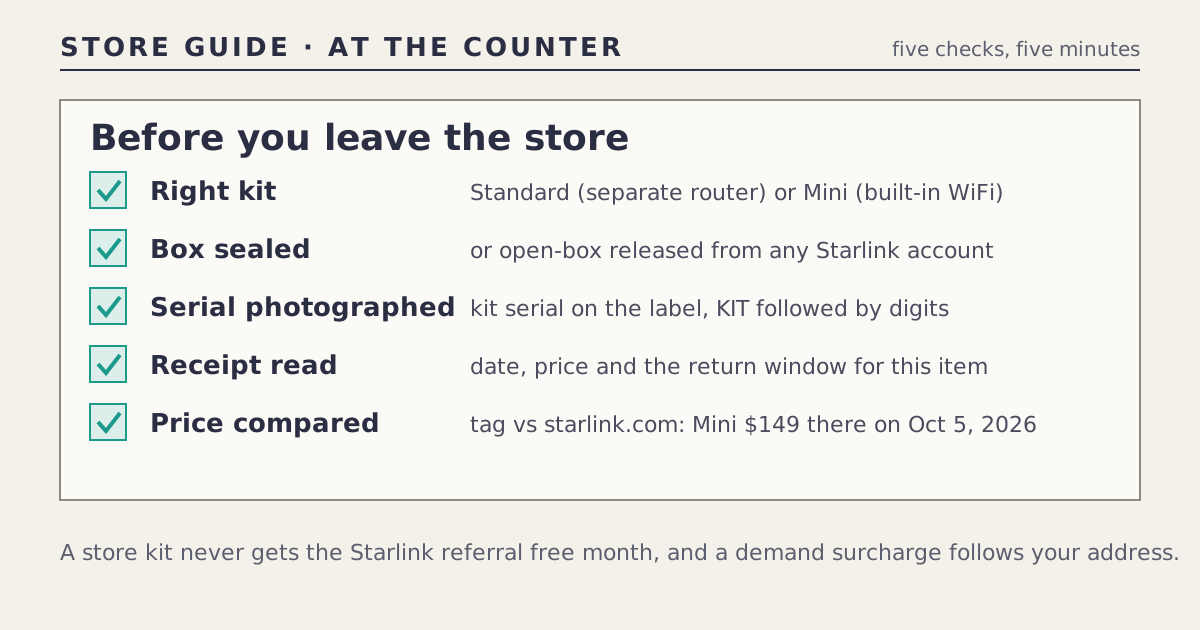
Before you leave the store with a Starlink kit, spend five minutes on five checks: the right kit, a sealed box (or an open-box kit released from any account), the serial number on the label, the return terms on the receipt, and the shelf price against starlink.com. Each one prevents a problem that’s much harder to fix once you’ve driven home, set up the dish, and found out.
None of this needs special knowledge, and most of it you can do at the register. Here’s what to look for and why.
Check 1: is it the kit you meant to buy?
Stores stock the Standard kit and the Mini, sometimes side by side and in similar white boxes, plus bundle variants. They do different jobs:
| Standard kit | Mini | |
|---|---|---|
| Built for | A fixed home | Travel, camping, vehicles |
| Router | Separate box | Built into the dish |
| Store price seen Oct 5, 2026 | $349 at Home Depot and Walmart; $349.99 at Best Buy | $249 at Home Depot; $249.99 at Best Buy |
| starlink.com, same day | $349 to buy where offered, or a $0-up-front rental | From $149 |
Store prices above were read from search-result snippets, not the product pages, so our log marks them “unclear”. If you’re buying for a home, the Standard kit goes with a Residential plan; a Mini normally goes on a Roam plan. Our Mini vs rental comparison helps if you’re unsure which fits.
Check 2: is everything in the box?
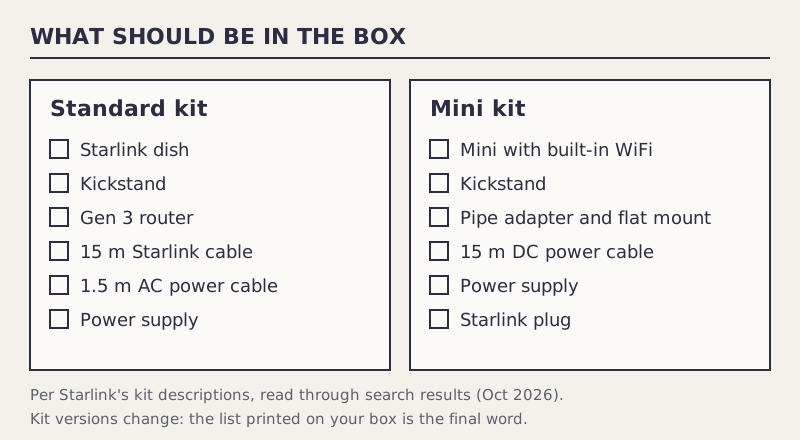
A sealed box from the shelf is very likely complete. The risk is with open-box, returned or display stock. Starlink’s descriptions, which we read through search results because the pages render with JavaScript, list:
- Standard kit: the Starlink dish, a kickstand, a Gen 3 router, a 15 m Starlink cable, a 1.5 m AC power cable, and a power supply.
- Mini kit: the Mini with built-in WiFi, a kickstand, a pipe adapter and flat mount, a 15 m DC power cable, a power supply, and a Starlink plug.
Kit versions change, so treat the list printed on your box as the final word. A Standard kit missing its router or power supply isn’t a bargain at any discount, and replacing parts costs time as well as money.
Check 3: photograph the serial number
Starlink’s instructions for transferring hardware say the kit serial number is on the kit’s shipping label and looks like KIT followed by digits. Take a photo of it, and of the box’s price sticker, before you leave. You’ll want it if:
- activation asks for it, or support does;
- you need to prove which kit you returned;
- the receipt doesn’t print it and the store asks for it on a return.
Check 4: open-box and returned kits
An open-box kit can be a fine buy, but it carries one risk a sealed box doesn’t: it might still be tied to the previous buyer’s Starlink account. Starlink’s transfer process is how an owner releases a kit: the owner cancels service and transfers the device, after which it’s removed from their account. SlashGear’s guide to that process says a kit can’t be transferred within 120 days of purchase or 90 days after activation, and that the warranty starts on the original purchase date and doesn’t reset on resale.
So at the register:
- Ask whether the kit has been released from any Starlink account. A returned kit should have been, but ask.
- Ask whether it was activated and when it was first sold, since the warranty runs from the original purchase.
- Count the parts against Check 2.
- Get open-box return terms on the receipt. Open-box items can carry their own rules.
If nobody can answer the account question, walk away. A kit you can’t activate is a return trip, and possibly a return-window problem.
Check 5: the receipt
The receipt decides your return rights, so read it before you leave the counter. Store windows we’ve logged, none of which names Starlink specifically:
| Store | Window (as logged) | Caveat |
|---|---|---|
| Home Depot | 90 days for most items; 30 for some consumer electronics | We couldn’t confirm which applies to Starlink |
| Best Buy | 15 days (60 for paid members); 14 for activatable devices | Starlink may count as activatable; a restocking fee may apply |
| Costco | 90 days for listed electronics | Starlink isn’t named on the list |
| Walmart | Not confirmed on walmart.com | Marketplace sellers set their own rules |
Ask the cashier which window applies to this item and whether the receipt shows it. Keep the box and every part until you’re sure you’re keeping the kit. Our return windows guide compares every seller in detail.
Before you pay: the price check
The tag might not be the cheapest way to get the same kit. On Oct 5, 2026, the Mini was $149 on starlink.com and around $249 in the Home Depot and Best Buy listings we saw, about $100 more, unless a store has matched since. The Standard kit was close to parity: $349 to buy on starlink.com where offered.
Two lines the tag won’t show:
- The free month, one line: store kits never qualify for the Starlink referral credit; it’s only issued for sign-ups on starlink.com.
- Address-based charges: a demand surcharge in busy areas follows your service address, not the store, so a store kit doesn’t avoid it.
Our store vs starlink.com tool does this comparison on a phone in the aisle.
A worked example
Alex finds an open-box Mini at a store for less than the boxed one. Alex counts the parts against the list (all there), asks whether it has been released from the previous account (the associate isn’t sure), and checks starlink.com on a phone: $149 for a new Mini with no account question. Alex skips the open-box kit. If the store had confirmed the release and the open-box price had been below $149, it might have been worth it, with the return terms written on the receipt.
Common mistakes
- Grabbing the wrong box. Check “Mini” or “Standard” on the box before the register.
- Not photographing the label. The serial number is useful later.
- Buying open-box without asking about the account.
- Assuming a 90-day window. Best Buy’s activatable-device window is 14 days.
- Paying the tag without checking starlink.com. The Mini gap was about $100 on Oct 5, 2026.
What we don’t know
- Which return window each store applies to Starlink specifically; none names it.
- Whether stores check that returned kits have been released before reselling them.
- Whether every store kit matches the contents lists above; versions change.
What to do next
The stores hub has each store’s listings and return rules, with pages for Home Depot and Best Buy. If you’ve already bought at a store and want to know what you can still do, see bought at a store.
Questions people ask
What should be in a Starlink Standard kit box?
Per Starlink's kit description (read through search results): the Starlink dish, a kickstand, a Gen 3 router, a 15 m Starlink cable, a 1.5 m AC power cable and a power supply. Check the list printed on your box too, since kit versions change.
What's in a Starlink Mini box?
Per Starlink's support article (read through search results): the Mini with built-in WiFi, a kickstand, a pipe adapter and flat mount, a 15 m DC power cable, a power supply and a Starlink plug.
Is an open-box Starlink kit safe to buy?
It can be, if it's complete and released from the previous owner's account. Starlink's transfer process removes a kit from the old account; ask the store whether that happened, and get the return terms in writing.
Where is the Starlink kit serial number?
Starlink's transfer instructions say the kit serial number is on the kit's shipping label and looks like KIT followed by digits. Photograph it before you leave the store.
Does a store Starlink kit get the free month?
No. Kits bought from retailers don't qualify for the Starlink referral credit; it's only issued for sign-ups on starlink.com.
Can I return a Starlink kit to the store after activating it?
That depends on the store's rules. Best Buy has a shorter window for activatable devices, and we couldn't confirm whether Starlink counts as one. Ask at the register and keep every part and the box.
Sources
- Starlink Standard kit contents (Starlink support, read via search results)
- The Starlink Mini kit includes (Starlink support, read via search results)
- Please read all information below prior to transferring Starlink hardware (Starlink support, read via search results)
- How to transfer Starlink ownership (SlashGear, Jan 31, 2025)
- Home Depot return policy (homedepot.com, search-result snippet)
- Best Buy return and exchange policy (bestbuy.com, search-result snippet)
- Costco electronics return policy (Costco tech support, search-result snippet)
- Starlink Mini kit (homedepot.com, search-result snippet)
- Starlink Mini kit (bestbuy.com, search-result snippet)
- How do I use a referral link? (Starlink support)
- Demand surcharge (Starlink support)